New AI animation styles · Image Studio
Break the mold.
Invent a style nobody has seen.
Most AI animation looks the same: the same glossy 3D, the same anime, the same borrowed studio look. These two films don’t. Each is one image prompt and one motion prompt in Pray Production Studio. Here are both prompts, taken apart line by line, so you can build a style of your own.
No animators. No studio. Two prompts each.
- Films
- 2
- Prompts each
- 2
- Length
- 30 sec
- Engine
- Seedance 2.5
Watch the films
One look.
Two stories.
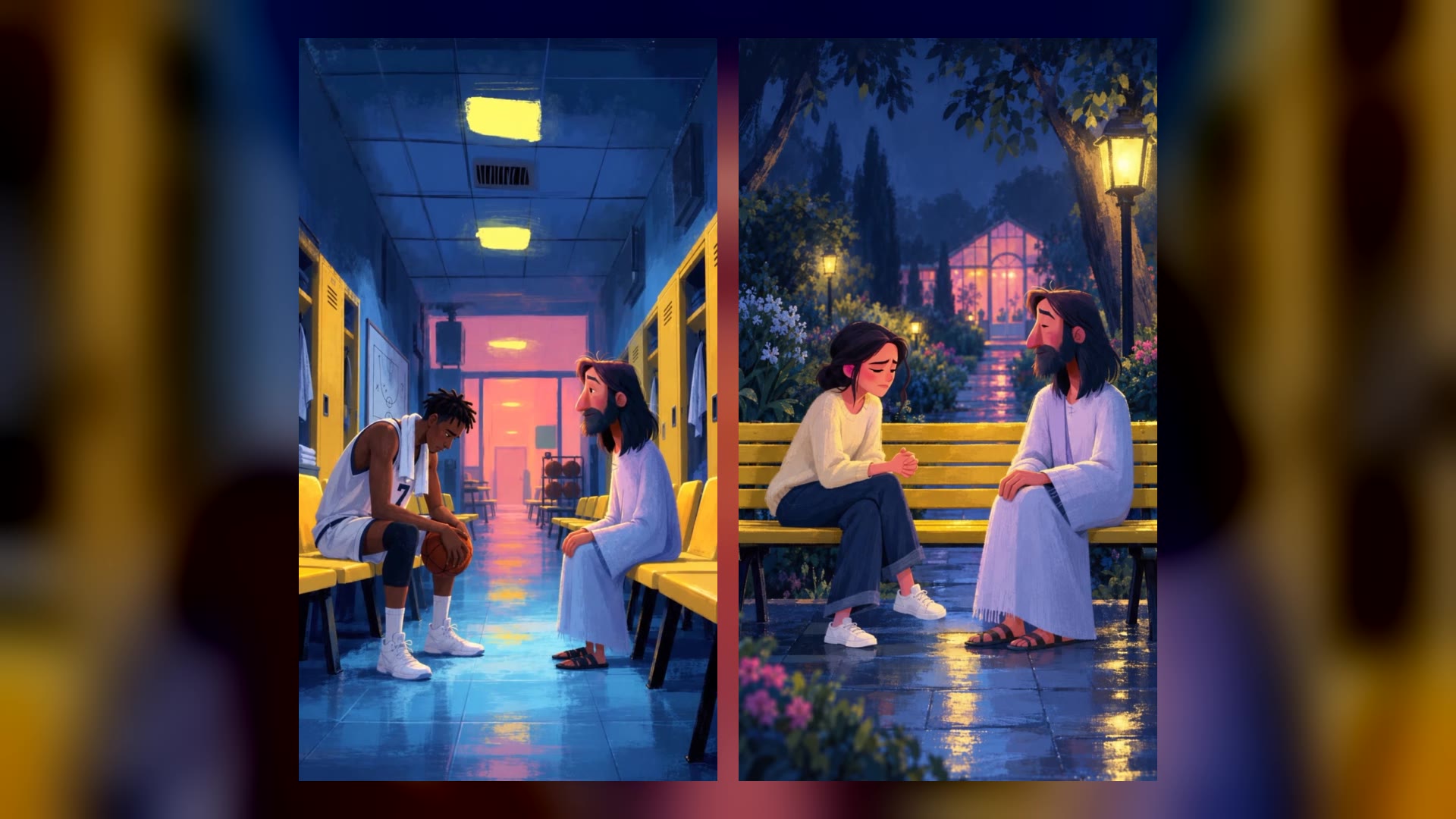
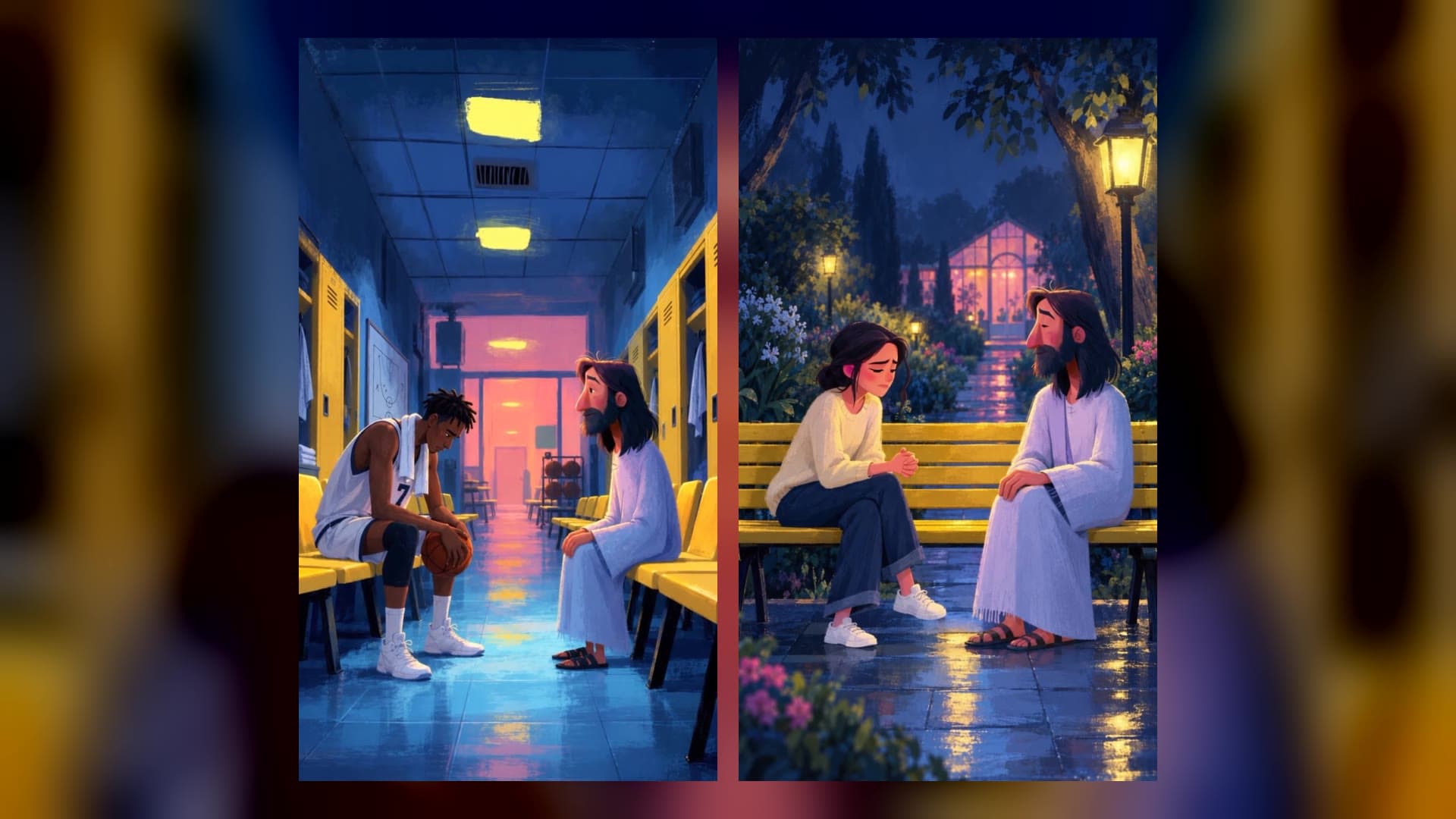
Painterly 2D, visible brush grain, cool blue night light against warm yellow. Thirty seconds each, one continuous take, with the characters speaking their own lines. Open either prompt and make it yours.
Locker Room After the Loss
A college player sits alone after a loss, and Jesus sits down a few seats away.
Jesus on the Park Bench
A young woman tells Jesus she is done with church, on a yellow bench in a garden at night.
The short answer
How to create a new animation style
with AI.
- 01
Name a medium, not a vibe.
Start the image prompt with what the picture is made of: painterly 2D illustration with visible brush texture. A medium brings its texture with it. "Cartoon" or "cinematic" lands on the look everyone else gets.
- 02
Give each color a light source.
Pick three colors and tie each one to something in the scene: cool blue night light, yellow ceiling panels, a pink glow from a far window. A small palette, assigned to real lights, is what makes a style recognizable.
- 03
Lock it in a frame, then move it.
Make the first frame in Image Studio, then animate that frame. The video inherits the look from the picture, and the motion prompt only has to direct the camera, the acting and the sound.
The style formula
Five slots.
Change one, get a new style.
A style is not a name. It is five decisions written into the prompt. Here is what these films chose for each one, and swaps to try when you want something the internet has not seen yet.
Tip: change one slot at a time. Keep the palette and the camera, swap the medium to gouache storybook, and you have a sibling style that still feels like a series.




Step one · The first frame
The image prompt,
line by line.
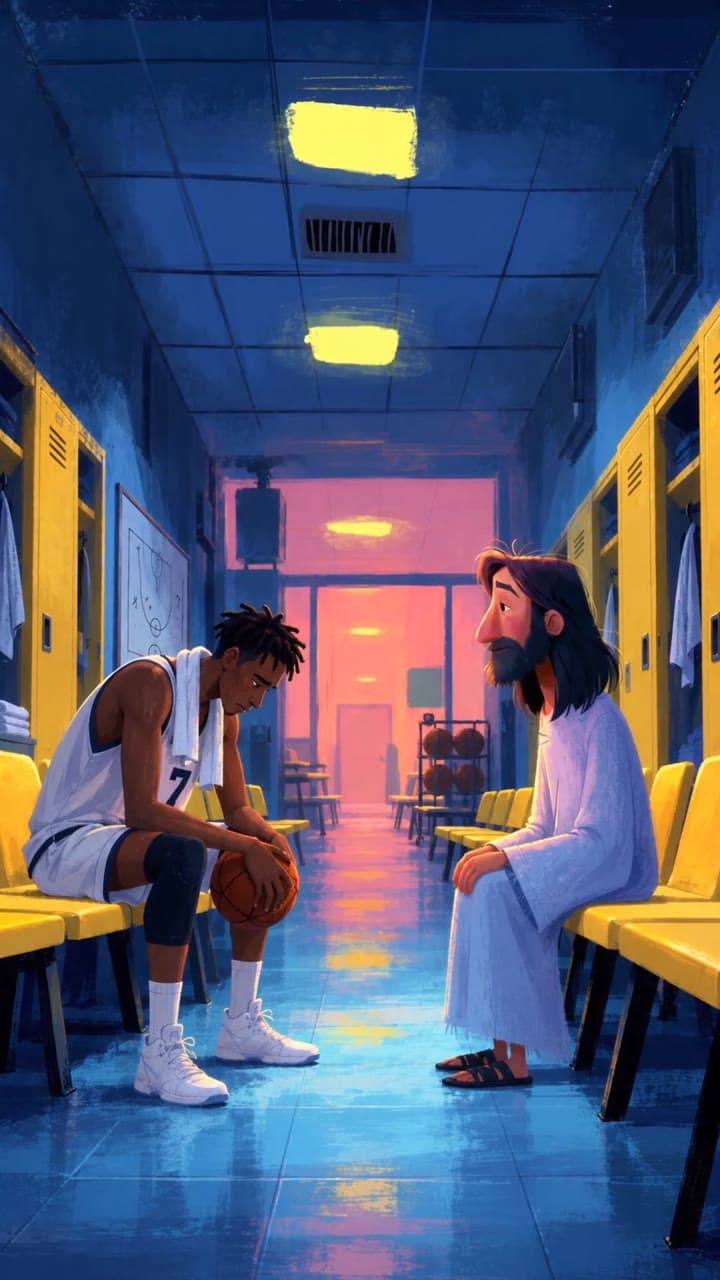
The style is born in one still image, made in Image Studio. This is the first frame of Locker Room After the Loss, and every phrase that built it.
Step two · Animate
The motion prompt,
in five parts.
Animate the frame with Seedance 2.5 at 30 seconds. The picture already carries the look, so the motion prompt directs the scene. Both films use the same five parts. These lines are from Jesus on the Park Bench.
- 01
Sound
NO BACKGROUND MUSIC ... Audio is dialogue and natural garden sounds only: faint crickets, rustling leaves.
Say what you hear and what you do not. Music goes on in the edit, so the clip stays clean.
- 02
Look lock
Keep the image’s look exactly for the whole clip: painterly 2D animation, visible brush grain ...
Repeat the style words from the image prompt so the motion never drifts toward 3D.
- 03
Starting state
A young adult woman, about 22 ... seated slightly forward on a yellow-painted wooden park bench.
Who is where when the clip begins. It matches the first frame, so the take starts on it.
- 04
Scene action
One continuous take. The camera slowly pushes closer and gently arcs between them as they talk.
The camera plan and the emotional arc of the whole 30 seconds, in two sentences.
- 05
Timeline
1.5 to 6.5 s: Camera eases toward a medium close-up of the woman. She says with frustration: “...”
Time range, camera, action and the exact line of dialogue. Only the speaking character moves their lips.
How they were made
Five steps
in Image Studio.
Each film’s breakdown, from the first frame to the finished take.
- 01
Open Image Studio and pick Story / Reel
Image Studio is where the style is born. Choose the vertical Story / Reel format, the Sunburst image model, and paste the first-frame prompt.
- 02
Generate the first frame
This one picture holds the whole look: the medium, the palette, the camera and both characters. Roll a few if you need to and keep the one that feels like a still from a film.
- 03
Hit Animate on the picture
Open the image and press Animate. Choose Seedance 2.5 and 30 seconds, the longest single take.
- 04
Write the motion prompt
Sound, look lock, starting state, scene action, then a timeline with every line of dialogue. The picture already carries the style, so the motion prompt directs the scene.
- 05
Generate and watch it move
Thirty seconds, one continuous take, with the dialogue spoken in the characters’ own voices.
The full prompts
Every word
of both films.
Exactly as they were generated. The image prompt makes the first frame in Image Studio (Story / Reel, 9:16). The motion prompt animates it on Seedance 2.5 at 30 seconds.
Locker Room After the Loss
Image prompt · the first frame
Vertical 9:16 frame. Painterly 2D animated illustration with visible brush texture, cool blue night light, flat yellow ceiling light panels and a soft pink glow from a frosted window at the far end. A long empty basketball locker room seen from a low wide angle in one-point perspective: rows of bright yellow benches and yellow lockers line both sides, blue tiled floor reflecting the light, a whiteboard with faint smeared play diagrams on the wall. Left foreground: a young Black basketball player, about 22, tall and lanky, short twists, sweat on his brow, plain white jersey with the number 7 and no logos, white towel around his neck, knee sleeve on one leg, slumped forward on a yellow bench with elbows on his knees and a basketball resting in his hands. Right, a few seats away on the same bench: a gentle Jesus figure with brown shoulder-length hair, a full dark navy beard, rosy cheeks and a lavender-white robe, sitting upright and calm, looking toward him. Quiet, melancholy, tender mood. No text, no logos.
Motion prompt · Animate, Seedance 2.5, 30 seconds
NO BACKGROUND MUSIC, no music, no score. Audio is natural sound effects only. Keep the image's look exactly for the whole clip: painterly 2D animation, cool blue night light, yellow ceiling panels, pink window glow, brush grain.

Standing state: Player, about 22, Black, short twists, white jersey number 7, towel around his neck, knee sleeve, basketball in his hands, slumped on a yellow bench. Jesus figure, brown shoulder-length hair, dark navy full beard, rosy cheeks, lavender-white robe, seated upright a few seats away. Long blue locker room with yellow benches and lockers, faint hum of lights, a distant dripping shower.

Scene Action: One continuous take. The camera slowly drifts and pushes between the two men as they talk. The player asks why doing everything right still ended in a loss and breaks down. Jesus answers gently, soft, and warm, and ends with a warm smile.

Timeline:
0 to 1.5 s: wide shot, slow push-in down the room toward both figures, light hum.
1.5 to 4 s: camera glides to a medium on the player, eyes closed, saying "I don't get it."
4 to 6.5 s: drift into an extreme close-up of his downcast face: "I trained every morning. I played clean."
6.5 to 8 s: camera pans to an extreme close-up of Jesus, who smiles softly: "I know."
8 to 10 s: pull back to a medium on the player, who looks up, slow push-in: "So why did we lose?"
10 to 12 s: camera slides behind the player's shoulder to frame Jesus: "Did you think working hard would make you untouchable?"
12 to 14 s: extreme close-up as a tear rolls down above the ball, his thumbs pressing into the leather.
14 to 17 s: wide shot, the player turns on the bench to face him: "It should have counted." Jesus: "It did. Just not on the scoreboard."
17 to 19 s: medium on the player protesting, hands open: "That's not fair."
19 to 21.5 s: extreme close-up of Jesus, slow push-in: "It rarely feels fair. But you're becoming someone."
21.5 to 23 s: medium, the player cries, shoulders shaking, the ball rolls slightly in his lap.
23 to 25.5 s: close on Jesus as he blinks slowly and smiles: "Losing is not proof you were forgotten."
25.5 to 27 s: wide shot, the player drops his head into one hand, the ball rolls off and bounces softly on the tile.
27 to 28.5 s: medium, he looks up tearfully: "Then who's with me now?"
28.5 to 30 s: extreme close-up, Jesus smiles broadly as the light softens: "I am." Slow push-in continues, his hair stirring gently as the frame fades toward black.
Jesus on the Park Bench
Image prompt · the first frame
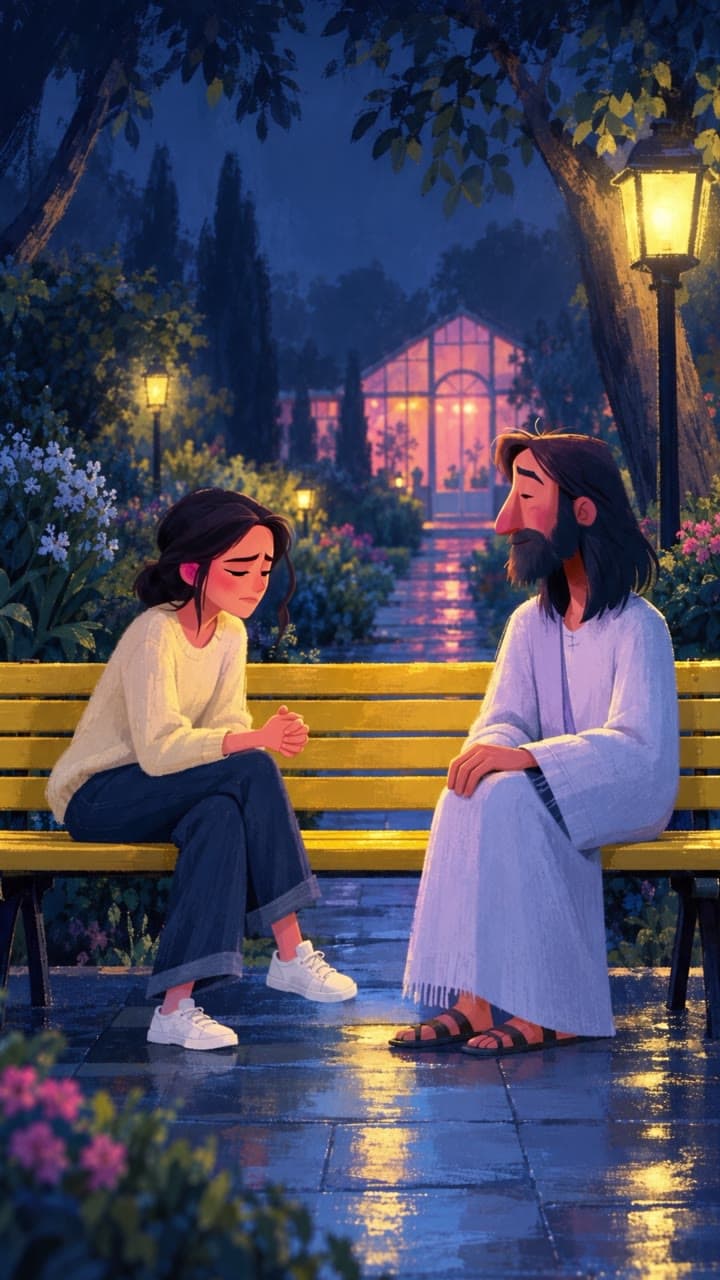
Vertical 9:16 frame. Painterly 2D animated illustration with visible brush texture, cool blue night light, warm yellow garden lamps and a soft pink glow beyond a frosted greenhouse window in the distance. A quiet garden at night seen from a low wide angle in one-point perspective: a blue stone pathway leads between lush flower beds, leafy shrubs and shadowy trees, its slightly damp surface reflecting the light. A long yellow-painted wooden park bench fills the lower foreground.

Left foreground: a young adult woman, about 22, with shoulder-length dark wavy hair, wearing a simple cream sweater, loose blue trousers and white sneakers, seated slightly forward on the bench, turned toward Jesus with a thoughtful, vulnerable expression, one hand resting in her lap and the other making a small conversational gesture. Right, a little space away on the same bench: a gentle Jesus figure with brown shoulder-length hair, a full dark navy beard, rosy cheeks and a lavender-white robe, sitting upright and calm, turned toward her with a warm, attentive expression. They are sharing a quiet, heartfelt conversation, their relaxed poses and gentle gestures suggesting trust and connection. Quiet, melancholy, tender mood. No text, no logos.
Motion prompt · Animate, Seedance 2.5, 30 seconds
NO BACKGROUND MUSIC, no music, no score. Audio is dialogue and natural garden sounds only: faint crickets, rustling leaves and a soft nighttime breeze. Keep the image’s look exactly for the whole clip: painterly 2D animation, visible brush grain, cool blue moonlight, warm yellow garden lamps and a soft pink greenhouse-window glow. Keep both characters’ designs and clothing exactly the same in every shot. No captions, text or logos.

Starting state: A young adult woman, about 22, shoulder-length dark wavy hair, cream sweater, loose blue trousers and white sneakers, seated slightly forward on a yellow-painted wooden park bench, hands clasped in her lap. Jesus, brown shoulder-length hair, dark navy full beard, rosy cheeks and a lavender-white robe, sits calmly beside her. A blue stone pathway leads between flower beds and shadowy trees toward a softly glowing greenhouse.

Scene action: One continuous take. The camera slowly pushes closer and gently arcs between them as they talk. The woman begins frustrated and disappointed. Jesus listens patiently, then gently challenges her perspective with warmth and affection. Her frustration gradually softens into humility and understanding. Natural speech, small gestures and meaningful pauses. Only the speaking character moves their lips. Use the exact dialogue below, with no additional speech or narration.

Timeline:

0 to 1.5 s: Wide shot, slow push toward both figures on the bench. The woman shakes her head, looking down. Leaves stir gently overhead.

1.5 to 6.5 s: Camera eases toward a medium close-up of the woman. She says with frustration: “I don’t want to go back to church, people there are such hypocrites.”

6.5 to 9 s: Camera gently arcs toward Jesus. He looks at her with understanding: “You wish their lives matched their words.”

9 to 10.5 s: Frame the woman over his shoulder. She turns toward him: “Shouldn’t they?”

10.5 to 14 s: Slow push toward Jesus. He nods gently: “Yes. And they need my grace. So do you.”

14 to 16.5 s: Camera drifts toward the woman. She opens her hands, still struggling: “But church should be different.”

16.5 to 22.5 s: Frame Jesus over her shoulder. His voice stays tender and steady: “It should. That’s why I call you to worship together, and learn to love each other.”

22.5 to 25 s: Close on the woman. Her hands relax in her lap. She asks quietly: “Even when it’s hard?”

25 to 28.5 s: Close on Jesus as a small, warm smile forms: “Especially then. There’s a place for you beside them.”

28.5 to 30 s: Gently widen to include them both. She holds his gaze, then gives a small, thoughtful nod. They sit together beneath the warm garden light as the leaves rustle softly.
Before your first style
Questions about AI animation styles.
- How do you create a new animation style with AI?
- Describe what the picture is made of instead of naming a famous style. Pick a medium and its texture, three colors tied to light sources, one camera geometry and a mood in three words. Make one still frame with that prompt in an image model, then animate the frame so the video keeps the look.
- Why does most AI animation look the same?
- Because most prompts name the same handful of looks: 3D cartoon, anime, or a well-known studio. The model falls back to its average version of that look. Specific materials, a small palette and a deliberate camera angle pull it somewhere new.
- Why make an image first instead of going straight to video?
- A still is fast to iterate on, and it locks the style, the characters and the composition before you spend a video generation. Animating that frame keeps the look for the whole clip.
- What is Image Studio?
- Image Studio is the image workspace in Pray Production Studio. You write a prompt, choose a format such as Story / Reel, and generate. Any image can be animated into a video with the Animate button.
- What is the difference between the Image Studio and Shorts buttons?
- Image Studio opens the two-step version used for these films: the first-frame prompt, then Animate with the motion prompt. Shorts opens the motion prompt alone as one text-to-video Short. Shorts is one step; the two-step route gives you the most control over the look.
- Can AI video characters speak dialogue?
- Yes. Seedance 2.5 generates the voices and lip movement from the prompt. Write each line in quotes in the timeline with who says it, and add that only the speaking character moves their lips.
- Can I use these prompts?
- Yes. Open them in Image Studio or Shorts with the buttons on this page, or copy them from the full prompts above. Then change the medium, the palette, the place and the people to make a style of your own.
Your style. Your story.
Stop borrowing a look.
Make the one they copy.
Open a prompt with everything filled in, change one slot, and press Generate.
Locker Room After the Loss
Jesus on the Park Bench
Pray Production Studio is made by Pray.com.